



We didn't invent the PLC ...
We just made them affordable
At AutomationDirect, we strive to provide an affordable solution for anyone who needs
practical control systems. From the smallest simplest machine to the most complex plantwide
operation, we have the low-cost controller to match your specs and your budget.
Our PLC families are constantly improving to not only meet ever-changing industry demands but also exceed your expectations.
If you've never purchased controllers from AutomationDirect, let us show you how price, quality and performance can work hand-in-hand for a better overall experience.
For more information on our PLC family roadmaps, check out the PLC Statement of Direction
Looking to learn the basics of PLCs?
Go to the
PLC Basics section
for more information.
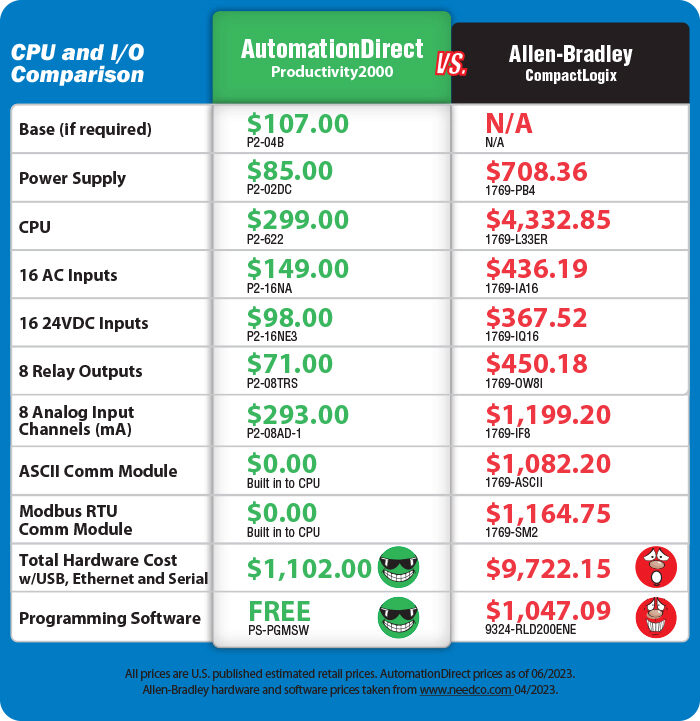
Productivity2000 Price Comparison
Federation Partner PLC Families

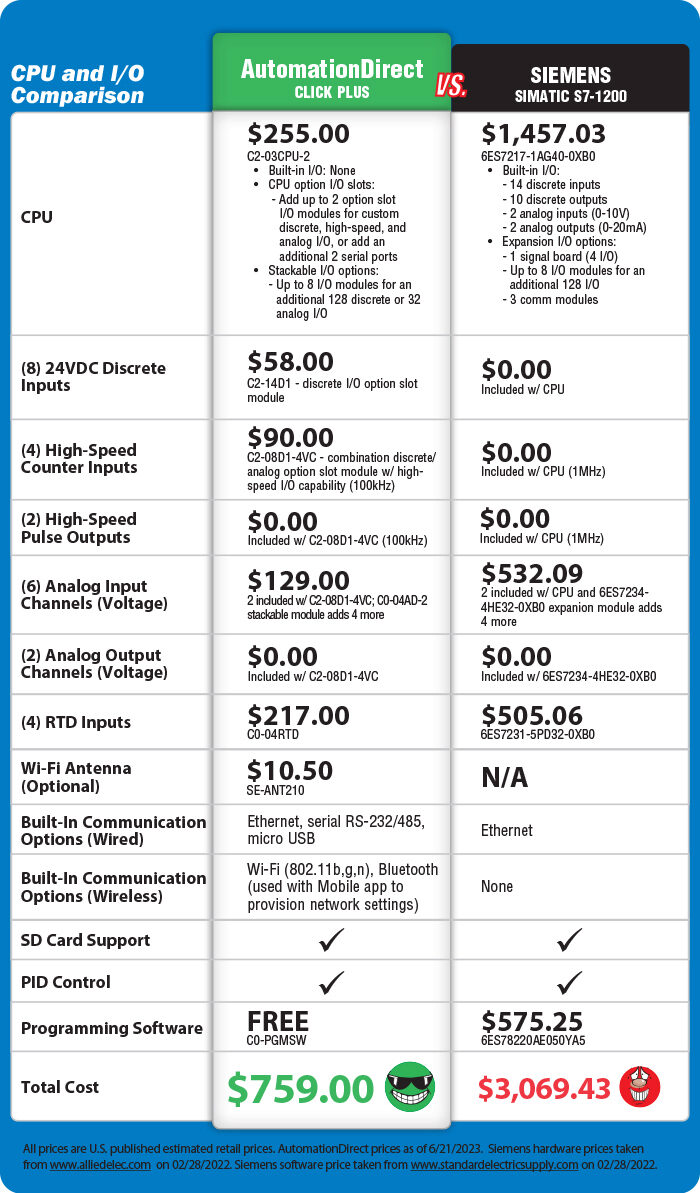
The CLICK PLC family
The CLICK PLC family offers extreme value for everyday applications. The compact size and easy programming make CLICK/CLICK PLUS great for small applications and beginner projects.
Simple control:
- PLC units with built-in I/O or customizable CPU I/O option slot(s), plus stackable I/O modules
- Perfect for small systems
- Ethernet, serial communication
- Enhanced security, Wi-Fi and MQTT communication, and data logging (CLICK PLUS only)
- High-speed counter/timer support
- 3-axis PTO/PWM motion control (CLICK PLUS only)
- Simplified PID (CLICK Ethernet/CLICK PLUS CPUs only)
CLICK Starting at
$92.00
(CLICK PLC Unit)
CLICK PLUS Starting at
$97.00
(CLICK PLUS CPU)




The Do-more PLC family
The Do-more PLC family is determined to get it done. This programming powerhouse has one of the most advanced instruction sets in the market and many other features that allow it to stand strong against any challenge.
Advanced Control:
- PLC units with built-in I/O and communications, plus stackable I/O modules
- Discrete and built-in high-speed I/O
- Analog with robust PID control
- Universal (all-in-one) analog and temperature I/O modules
- PWM outputs
- Coordinated motion control using on-board or expansion I/O modules and advanced motion instructions
- Ethernet, serial, USB and custom communications ports
- Internal RAM and external MicroSD data logging
- Project simulator
- Integrated security
- Rack-based systems also available
- Seamless integration with high-level IT systems and IIoT/cloud platforms using MQTT(S), HTTP(S), FTP protocols and Rest API capability (BRX only)
Starting at
$205.00
(BRX PLC Unit)


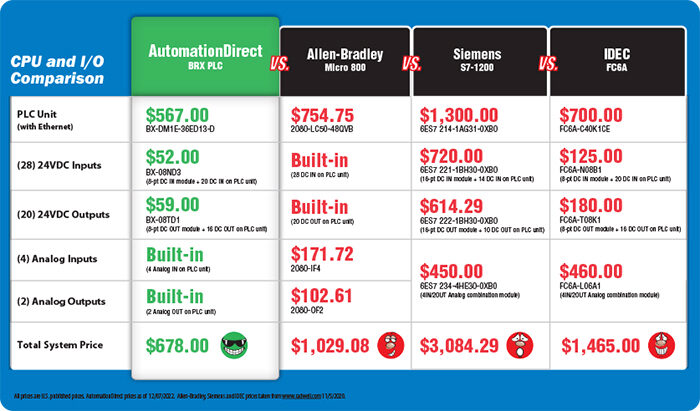


The Productivity Series PLCs
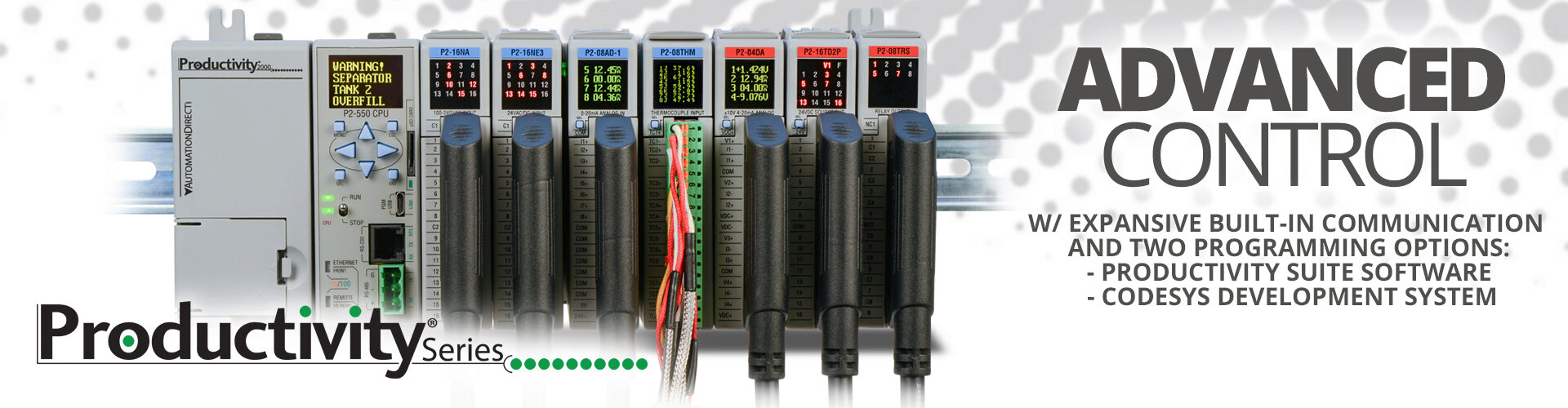
The Productivity family of PLCs is our most versatile family. In terms of hardware, Productivity offers three distinct form factors with two being rack-based and one being stackable. Each series (P1000, P2000, P3000) offers different I/O capacities but all use the same programming software, allowing you to easily scale your control up or down depending on the application or machine build. The ProductivitySuite software provides versatile programming with tag name addressing that has no predefined memory structure, and offers convenient device integration for easy plug-and-play operation with our PS-AMC motion controllers, GS drives, Protos X field I/O, and StrideLinx VPNs.
Advanced Control:
- Rack-based systems with pluggable CPU and I/O modules, or stackable form factor available
- Tag name based programming with 50MB user memory
- Numerous built-in communication options including Ethernet, serial, USB, remote and local expansion
- Support for EtherNet/IP (implicit and explicit) with convenient EDS library
- MQTT(S) capability for cloud networking connections
- Web server and mobile access
- OLED/LCD module data displays (P2000/P3000)
- Integrated motion controller, GS drive, StrideLinx VPN and Protos X field I/O support
- External microSD data logging
- Scalable platforms from 128 to over 59K I/O points with analog, discrete, pulse width modulation, and high-speed options
- ABS certified for marine applications (select P2000/P3000 modules)
- Project simulator
- Easy-to-use coordinated motion control with the PS-AMC motion controllers and built-in motion instructions
Starting at
$237.00
(P1000 CPU module)
ProductivityCODESYS PLC
The ProductivityCODESYS PLC system combines the Productivity2000 hardware with a CODESYS engine for those who prefer CODESYS programming but need a low-cost hardware solution. The ProductivityCODESYS PLC does not support Productivity Suite software.
Advanced Control:
- Rack based system utilizing Productivity2000 bases, power supplies, and I/O modules
- CPU with CODESYS runtime application and numerous built-in communication ports
- Fully IEC 61131-3 compliant with sequential function charts, ladder diagrams, function block programming, structured text, and more
- Several CODESYS add-on licenses included for fieldbus communication, system visualization, and IIoT applications
CPU priced at
$529.00
(ProductivityCODESYS CPU)


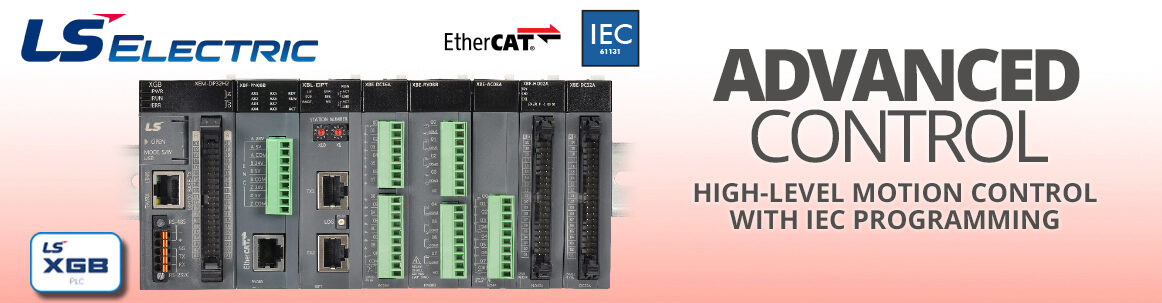
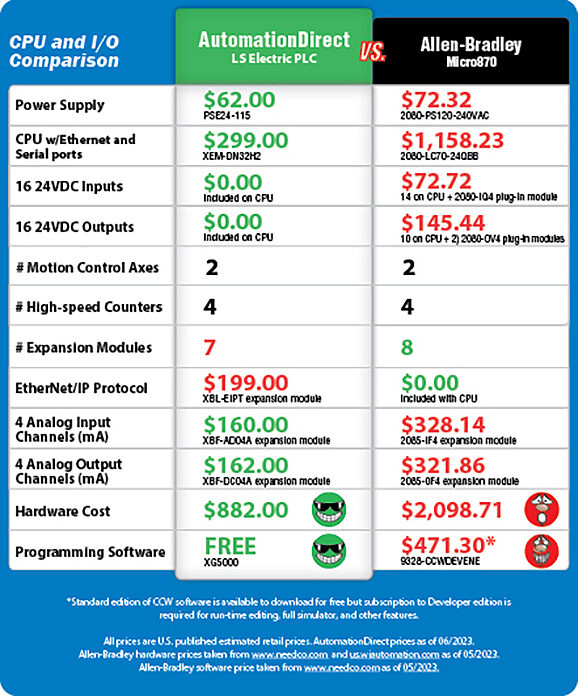
XGB PLCs from LS Electric
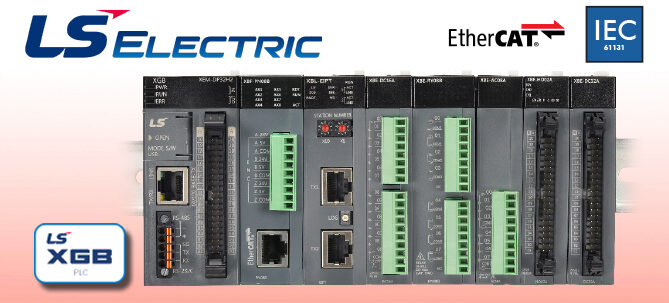
The XGB PLC is designed and manufactured by LS Electric - a well-established, global PLC manufacturer with over 40 years of experience. This controller series features many advanced features and although it is designed with motion control in mind, its many capabilities would prove beneficial in any application.
Advanced control:
- Super compact design
- 4 stackable, micro PLC processors with 16 inputs and 16 outputs including motion control capability
- 2-axis and 6-axis versions
- NPN and PNP versions
- 4 high-speed counter inputs, 4 preset inputs
- Support for several positioning methods including linear, circular, helical, and ellipse interpolation
- Ethernet, serial, and USB ports
- Supports up to 7 expansion modules including analog I/O, high-speed counter, EtherCAT, and EtherNet/IP modules
- EtherCAT expansion modules allow for up to 16 axes of ultra precise motion control
- Supports several IEC standard programming languages including structured text
- Project simulator
- Up to 16 PID loops for reliable process control
Starting at
$299.00
(XGB PLC Unit)
Industrial-grade Open Source Control
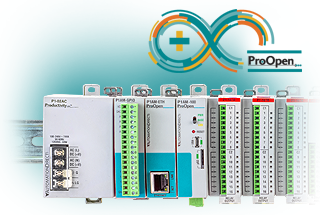
ProductivityOpen - Industrial Open-Source Controller
Programmable controllers have become the primary automation method for many industries and applications providing accurate, reliable, easily-modified control. Open-source controllers have grown in popularity due to their extremely low cost and their ability to utilize openly shared programs found online in their applications. The ProductivityOpen controller allows the same sharing of ideas and programs but is hardened for the industrial environment.
Open-source control:
All the great features of standard commercial microcontroller plus the added power of Productivity
- Industrialized for 24VDC power and ESD
- UL61010 listed for industrial applications
- Add-on industrial-grade shields for product optimization
- Compatible with Arduino® MKR shields
- Compatible with P1000 I/O modules
- Expandable I/O with up to 240 points
- C++ or CircuitPython programming
- ProductivityBlocks, intuitive block programming software (P1AM-100 CPU and legacy Arduino IDE only)
- 2 year warranty
- Low cost
- Long-term service and support
Starting at
$69.00
(CPU)


AutomationDirect PLC Tools & Information:
- Federation Partner PLC Families Overview
- Federation Partners
- Federation Partner PLC What's New and Care-abouts
- Federation Partner PLC FAQs
- CLICK PLCs
- Do-more & BRX PLCs
- Productivity Series PLCs

AutomationDirect PLC Video Tutorials:

FREE PLC Programming Software Downloads:
- CLICK PLC Software
- Do-more PLC Software
- Productivity PLC Software
- LS XG5000 PLC Software
- CODESYS Development System

AutomationDirect Company Info:

PLC Basics:


 Safe &
Secure
Safe &
Secure

We accept VISA, MasterCard, Discover, American Express, PayPal or company purchase orders.


 Updating...